Life Steps
- 4.2
- Rating
- 10.00K
- Installs
- Free
- Price

 Analysis by App-foxy
I approached Life Steps as a business-oriented guide rather than as a general wellness tracker. Its focus sits around essential oils, health, and Young Living, so the useful question is not simply whether it looks polished, but whether it helps you make calmer, better-informed choices without asking you to hand over more personal information than you expect. After spending time with it, my view is cautious but positive: it can be a practical reference for people already interested in this subject, while anyone looking for independent medical guidance, advanced business software, or a fully transparent research tool should keep their expectations firmly in check.
The app is free to install and is suitable for Everyone, which makes trying it relatively easy. It comes from Support Stream, Inc., and its current version is 2.1.7, with Android support beginning at version 7.0. That broad device compatibility is helpful if you use an older phone, although an older operating system also makes it sensible to pay attention to the permissions and account choices shown during setup rather than accepting every prompt automatically.
What Life Steps is really useful for
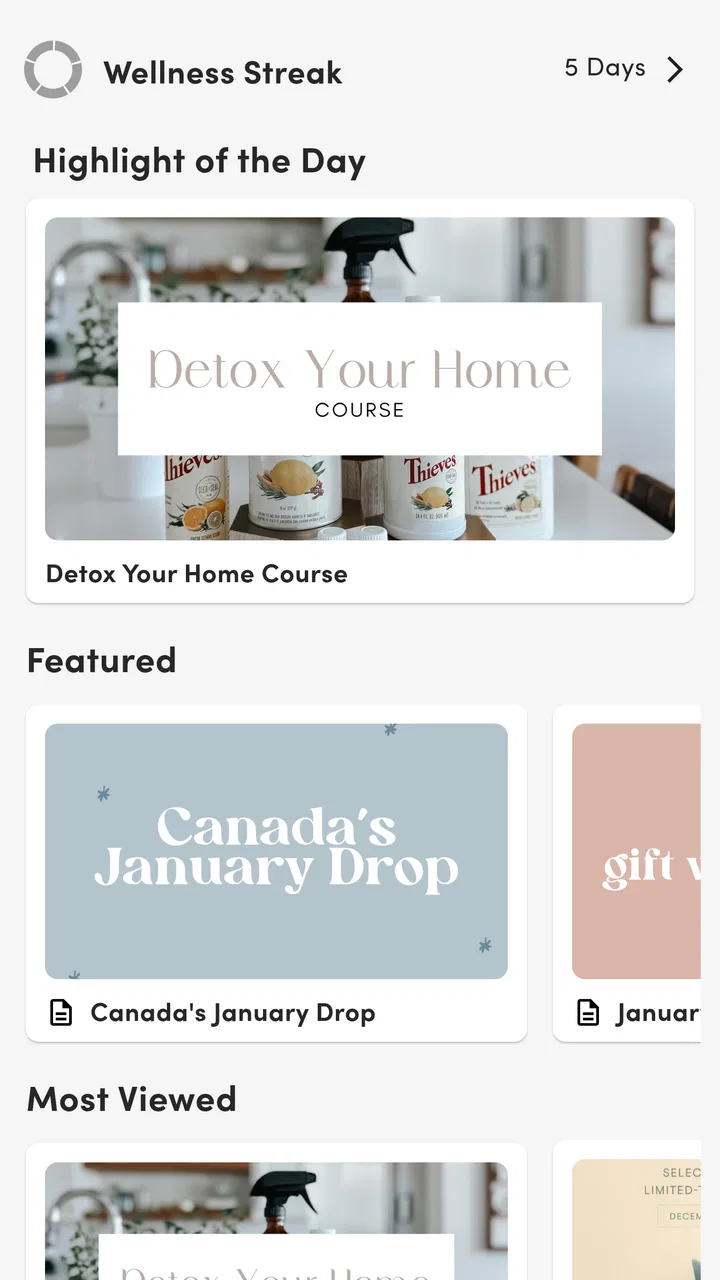
The strongest way to use Life Steps is as a quick, repeatable reference. I would open it when I wanted to look up a topic connected with oils, everyday health habits, or the Young Living ecosystem, then use the information as a starting point for a decision. It is better suited to browsing and orientation than to replacing a doctor, pharmacist, qualified aromatherapist, or detailed business accounting system.
You May Also Like

 AccuWeather: Weather Radar
AccuWeather Review: A Quick, Clear Forecast for Everyday Decisions
For everyday plans, the best forecast is the one you can understand quickly. AccuWeather makes rain timing, radar, and local conditions easy to act on, with a few trade-offs.

 Hill Climb Racing
Why Hill Climb Racing Still Turns Crashes Into One More Run
A tiny car, a bumpy hill and one more upgrade: Hill Climb Racing keeps resurfacing because its simple chaos makes every near-miss feel personal.

 AliExpress - Shopping App
AliExpress Makes Global Shopping Feel Personal, but Shoppers Bear the Risk
AliExpress turns a global marketplace into a pocket-sized discovery engine. Its reach is useful, its shopping loop compelling, and its trade-offs easy to miss.

 Lords Mobile: Kingdom Wars
Lords Mobile Is a Kingdom-Building Routine, Not a Quick Match
A case-by-case verdict on the building, battles, device demands, and social commitments that make Lords Mobile rewarding for some players and exhausting for others.

 PDF Scanner app - TapScanner
TapScanner Makes Paperwork Easier to Capture, Check, and Share
TapScanner makes scanning with a phone feel less like a rescue operation and more like a dependable step in getting work done. Its capture tools are useful, though not flawless.

 Block Blast!
Block Blast! Shows How Much a Puzzle Game Can Leave Out
A quiet grid game shows why puzzle players increasingly value instant clarity, repeatable skill and low-pressure play—and where the genre still needs to catch up.
More From Our News Desk
View All News


That distinction matters. A guide can help you organize questions, compare ideas, and remember what you wanted to investigate. It cannot automatically turn a wellness suggestion into medical advice. If you are pregnant, taking medication, managing an allergy, caring for a child, or dealing with a persistent symptom, I would treat anything inside the app as background reading and verify important decisions with an appropriate professional.
In practical terms, I can see Life Steps fitting into a small daily routine. Imagine someone preparing for a busy week who wants to review an oil-related topic before shopping, make a short note of questions, and then discuss those questions with a healthcare professional or experienced user. The app can be useful in that first stage because it keeps the subject in one place instead of forcing you to jump between social posts, search results, and promotional pages.
It is also relevant to people exploring Young Living and wanting a more structured way to become familiar with its language and health-related themes. The trade-off is that a source connected to a particular brand ecosystem may naturally feel different from a neutral library or public-health resource. I would use it to understand the conversation, not as my only source when evidence, safety, or cost is important.
Trust begins with knowing what role the app plays
Life Steps has an average rating of 4.2 from roughly a hundred ratings, with several dozen written reviews and more than ten thousand installs. Those figures suggest that it has found a real audience, but they do not prove that every health-related statement will suit every user. I read the rating as a reason to investigate the app, not as a substitute for checking how it handles information and user choices.
The developer identity is visible as Support Stream, Inc., which gives users a concrete name to associate with the product. That is preferable to treating an app as an anonymous collection of pages. Still, trust should come from the choices you can actually see: what the app requests, whether account creation is necessary for the parts you want, how clearly paid options are presented, and whether you can leave without unnecessary friction.
One detail worth keeping in mind is the commercial model. The app itself is free, but in-app purchases range from around thirteen dollars to around forty dollars per item. I would not assume that installing it gives access to every useful part at no cost. Before confirming a purchase, I would check exactly what the item unlocks, whether it is a one-time purchase, and whether the content is genuinely relevant to my needs rather than simply adjacent to them.
This is especially important for a wellness and brand-focused app because curiosity can easily become spending. A reader may begin with a simple question and end up considering products, guides, or premium material. That is not automatically a problem, but the decision should remain deliberate. I would set a personal limit before browsing paid material and avoid purchasing anything while feeling pressured by urgency or health anxiety.
Permissions and account choices deserve a deliberate look
The most responsible way to begin is to install Life Steps, read each permission request in plain language, and allow only what matches the task you want to perform. I would not grant access simply because a prompt appears during onboarding. If a feature does not make sense without a particular permission, that should be clear from the explanation; if it is unclear, I would decline first and see whether the app remains usable.
The same approach applies to account creation. If Life Steps offers useful reading without an account, I would start there. If an account is requested for saved content, purchases, or synchronization, I would decide whether that benefit is worth providing contact details. A separate password is sensible, especially if the app uses an account that may contain purchase history or personal preferences. I would never reuse the password from email, banking, or a primary social account.
There is a practical advantage to this cautious setup: it gives you a baseline. You can see how the app behaves before adding personal details, buying anything, or making it part of your routine. That makes later decisions easier because you are judging a specific benefit rather than responding to a sequence of prompts.
I also recommend checking the operating system’s permission manager after installation, not only during the first launch. People often tap through setup quickly and forget what they accepted. Reviewing access later lets you remove anything that no longer seems necessary. This is not a criticism unique to Life Steps; it is simply the sensible way I handle any app that touches health-related interests or a commercial account.
Where privacy becomes more important in everyday use
Life Steps may feel low-risk when you are only reading general material, but the situation changes if you enter personal health questions, symptoms, allergies, medication details, household information, or notes about another person. I would avoid placing sensitive medical details into free-text fields unless I had a clear reason and understood who could access them and how long they might remain available.
Even a harmless-looking note can become identifying when combined with a name, location, age, or account email. My preferred workflow is to keep private health records in a dedicated, trusted system and use Life Steps only for broad learning and non-identifying reminders. For example, instead of writing a detailed medical history, I might note “ask pharmacist about topical use” in my own private notes and use the app to review the general topic.
Notifications deserve similar attention. If the app sends reminders or updates, I would check whether their text appears on a lock screen. A message about a health interest may reveal more than you intend to someone nearby. Turning off lock-screen previews, limiting notifications to useful alerts, or disabling them entirely can preserve convenience without exposing your interests.
Shared devices create another small but real risk. If family members use the same phone or tablet, an account may remain signed in, and purchase screens or saved material may be visible to anyone who opens the app. I would sign out when appropriate, use the device’s own screen lock, and avoid storing payment details unless the convenience clearly outweighs the risk.
For purchases, I would use the platform’s purchase authentication and review the transaction screen carefully. The free download lowers the barrier to trying the app, but the paid range means a child or another household member should not be able to buy content accidentally. The Everyone age rating describes broad suitability; it does not remove the need for responsible purchase controls or careful interpretation of health material.
How much control the user keeps
My preferred apps make it easy to change direction: browse without committing, refuse optional access, manage notifications, and stop using the service without losing control of the device. Life Steps is easiest to trust when you treat those choices as part of the experience rather than as administrative details. I would begin with the smallest setup possible, test the core reading experience, and add only the account or purchase features that solve a real problem.
If you later decide the app is not for you, remove saved information first where the interface allows it, cancel any optional arrangement through the relevant account controls, revoke permissions, and uninstall it. I would also check the operating system’s subscription or purchase area rather than assuming that deleting the app automatically ends every financial arrangement. That habit is useful because app removal and account closure are not always the same action.
Another useful form of agency is keeping your own context. I would record the source and date of an important recommendation outside the app, especially if it influences a health decision. That gives me a way to revisit the reasoning later instead of relying on memory or assuming that an article will always remain unchanged. It also helps separate a general educational suggestion from advice intended for my particular situation.
For families, I would establish a simple rule: children can browse age-appropriate material only with an adult nearby, and no one buys anything without permission. For a workplace or small wellness group, I would avoid treating the app as a shared medical record. It may help people discuss general topics, but personal health information should stay in systems designed for confidentiality and controlled access.
Where it beats ordinary alternatives, and where it does not
Compared with a general web search, Life Steps can feel more focused because the subject area is narrower. A search engine gives you a huge mixture of retailer pages, personal blogs, forums, and medical resources; that variety is useful, but it also creates more work. A dedicated guide can reduce the initial sorting effort when your question already belongs to the app’s world.
Compared with a neutral health reference, however, I would expect less distance from the Young Living context. If my priority were medical evidence, interactions, contraindications, or a diagnosis, I would choose a reputable health organization, a licensed professional, or a reference designed specifically for clinical information. Life Steps may help me form a question, but it would not be my final authority.
It also differs from a conventional business app. Despite sitting in the business category, I would not use it as a replacement for bookkeeping, inventory management, customer relationship management, invoicing, or team collaboration. Someone seeking those tools should choose software built around those jobs. Life Steps makes more sense for orientation and lifestyle-related reference than for running the operational side of a business.
The app’s free entry point is more convenient than buying a specialist book before knowing whether the subject interests you. On the other hand, the presence of paid items means the total cost can grow, while a library book or public resource may offer a more predictable expense. My choice would depend on whether the app’s organization and convenience save enough time to justify any optional purchase.
Small workflows that make the experience safer and more useful
My first tip is to use a “question first, purchase later” routine. Before opening paid material, write down the exact problem you are trying to solve and what kind of answer would satisfy you. If the item does not clearly address that problem, skip it. This prevents a broad interest in oils or wellness from turning into an unfocused series of purchases.
My second tip is to separate discovery from verification. Use Life Steps to discover terminology, possible topics, and questions worth asking. Then verify safety-sensitive points somewhere more appropriate. This two-stage workflow is more reliable than treating every convenient explanation as a personalized recommendation, and it still lets the app save you time at the beginning.
My third tip is to keep personal data out of exploratory searches. Search or browse using general wording, and keep names, diagnoses, prescription details, and identifying household information in a private note system. You still get the educational benefit while reducing the amount of sensitive context attached to your account or device.
A fourth useful habit is to review the app after a week rather than deciding immediately that it belongs on your home screen. Ask whether you actually return to it, whether it answers questions efficiently, and whether the paid material adds something concrete. If it mainly redirects you toward products or leaves you with more uncertainty, a neutral reference may be the better choice.
Who should try it and who should skip it
I would recommend trying Life Steps if you already have a clear interest in essential oils, Young Living, or related wellness conversations and want a single place to browse. It is also reasonable for a curious beginner who understands that the app is a starting point, not a medical consultation. The free installation makes that trial less demanding, provided you remain careful with optional purchases and personal information.
I would skip it if you want a strictly independent health authority, detailed scientific citation, professional clinical decision support, or full business administration. I would also avoid relying on it for urgent symptoms, medication decisions, serious allergies, or treatment changes. In those situations, the right alternative is a qualified professional or a source designed around evidence and patient safety.
Users who dislike brand-centered content may find the Young Living connection too influential for their needs. They may be happier with a public-health library or a general reference that does not sit inside a commercial product ecosystem. That does not make Life Steps useless; it simply means the app’s context should match the user’s expectations.
My cautious verdict after using it
Life Steps is a focused business-category app from Support Stream, Inc. that can make essential-oil and Young Living topics easier to approach. I like its potential as a first stop for organized browsing, especially when I want to turn a vague interest into a short list of questions. I also appreciate that the free entry point lets a user evaluate the experience before deciding whether any paid material is worthwhile.
My reservations are equally important. Health-related content needs context, brand-oriented guidance is not the same as independent medical advice, and the paid items require a deliberate approach. I would install it with permissions limited to what I understand, avoid entering identifying health details, protect account and purchase controls, and verify important claims elsewhere.
In the end, I see Life Steps as a useful companion for informed curiosity, not an authority to follow automatically. Its real value depends on active user judgment. If you want a focused guide and are comfortable checking sensitive information through better-qualified sources, it is worth exploring. If neutrality, clinical depth, or traditional business tools matter more, I would choose a different option and leave this one out of my core toolkit.
FAQs for Life Steps
01What is Life Steps and what can I use it for?
Life Steps is a lifestyle and personal development app designed to help users organize daily routines, build healthier habits, and make steady progress toward personal goals. After exploring its features, the app feels most useful for people who prefer simple, manageable actions instead of trying to change everything at once. It can support planning, motivation, progress tracking, and maintaining consistency over time.
02Is Life Steps free to download and use?
Life Steps can generally be downloaded without an upfront payment, but some features may depend on the version available for your device, region, or any optional premium plan offered by the developer. Before subscribing, users should review the pricing, billing frequency, trial conditions, and cancellation rules shown in the app store. This is especially important if advanced tracking or personalized tools are locked behind a purchase.
03Is Life Steps suitable for beginners who have never used a habit or wellness app?
Yes, Life Steps is suitable for beginners because its concept is based on completing practical steps gradually rather than managing a complicated productivity system. New users can start with a small number of goals and learn the interface as they go. However, the app works best when goals are realistic and specific. Setting too many ambitious targets at once may make the experience feel overwhelming.
04Does Life Steps require an internet connection or access to personal information?
Some parts of Life Steps may work offline, particularly basic viewing or recording functions, while synchronization, account services, notifications, backups, or online content may require an internet connection. During setup, the app may request information related to goals, routines, or progress. Users should read the privacy policy and permission requests carefully, and only provide optional information when they are comfortable with how it will be used.
05Can Life Steps replace professional medical, fitness, or mental-health advice?
No. Life Steps should be treated as a support and organization tool, not as a replacement for a doctor, qualified trainer, therapist, or other healthcare professional. Its reminders, suggestions, and progress features may help users stay motivated, but they cannot diagnose conditions or create a treatment plan. Anyone with a medical concern, injury, serious emotional difficulty, or special health requirement should seek professional guidance before making significant changes.
Pros
- Simple step tracking with an easy-to-understand interface.
- Useful reminders can encourage users to stay active throughout the day.
- Progress views make it easier to monitor daily walking habits.
- Suitable for beginners who want basic activity-tracking features.
- Can support motivation by turning movement goals into daily challenges.
Cons
- Accuracy may vary depending on phone placement and sensor quality.
- Continuous tracking can increase battery consumption on some devices.
- Some features may require background activity or motion permissions.
- Limited functionality for users seeking advanced fitness analysis.
- Notifications and reminders may become repetitive over time.

Life Steps
Gallery